Every organization has information trapped inside documents.
PDFs, scanned forms, W-2s, 1099s, applications, correspondence, tax documents, government forms, and other records contain valuable information that computers cannot easily use until it is captured, understood, and transformed into structured data.
So, how do you turn unstructured documents into structured data?
The answer is no longer simply OCR.
Fairfax Software’s, Quick Modules + AI combines Optical Character Recognition (OCR), artificial intelligence, machine learning, document classification, data extraction, validation, and automation to transform information locked inside documents into structured, machine-readable data.
The process can be summarized as:
Capture → Understand → Extract → Validate → Structure → Automate
For organizations processing thousands or millions of documents, this can reduce manual data entry, improve accuracy, accelerate processing, and make document information available to business applications, workflows, analytics, and AI systems.
What Is Unstructured Document Data?
Unstructured data is information that does not follow a predefined database structure.
A database may store a customer’s name, address, and account number in separate fields. A document may contain all that information in different locations, formats, fonts, layouts, or handwriting.
Examples of unstructured or semi-structured documents include:
- PDFs
- Scanned images
- W-2 and 1099 tax forms
- Government applications
- Invoices and receipts
- Insurance documents
- Correspondence
- Claims
- Legal documents
- Financial records
- Multi-page forms
The information is there, but it is not necessarily available to a computer as usable fields.
For example, a scanned W-2 may contain an employee’s name, employer, wages, and tax withholding information. To a person, the information is obvious. To a computer system, it may simply be an image.
This is where document capture and Intelligent Document Processing become important.
What Is Structured Data?
Structured data is information organized in a consistent format that computers and applications can easily process.
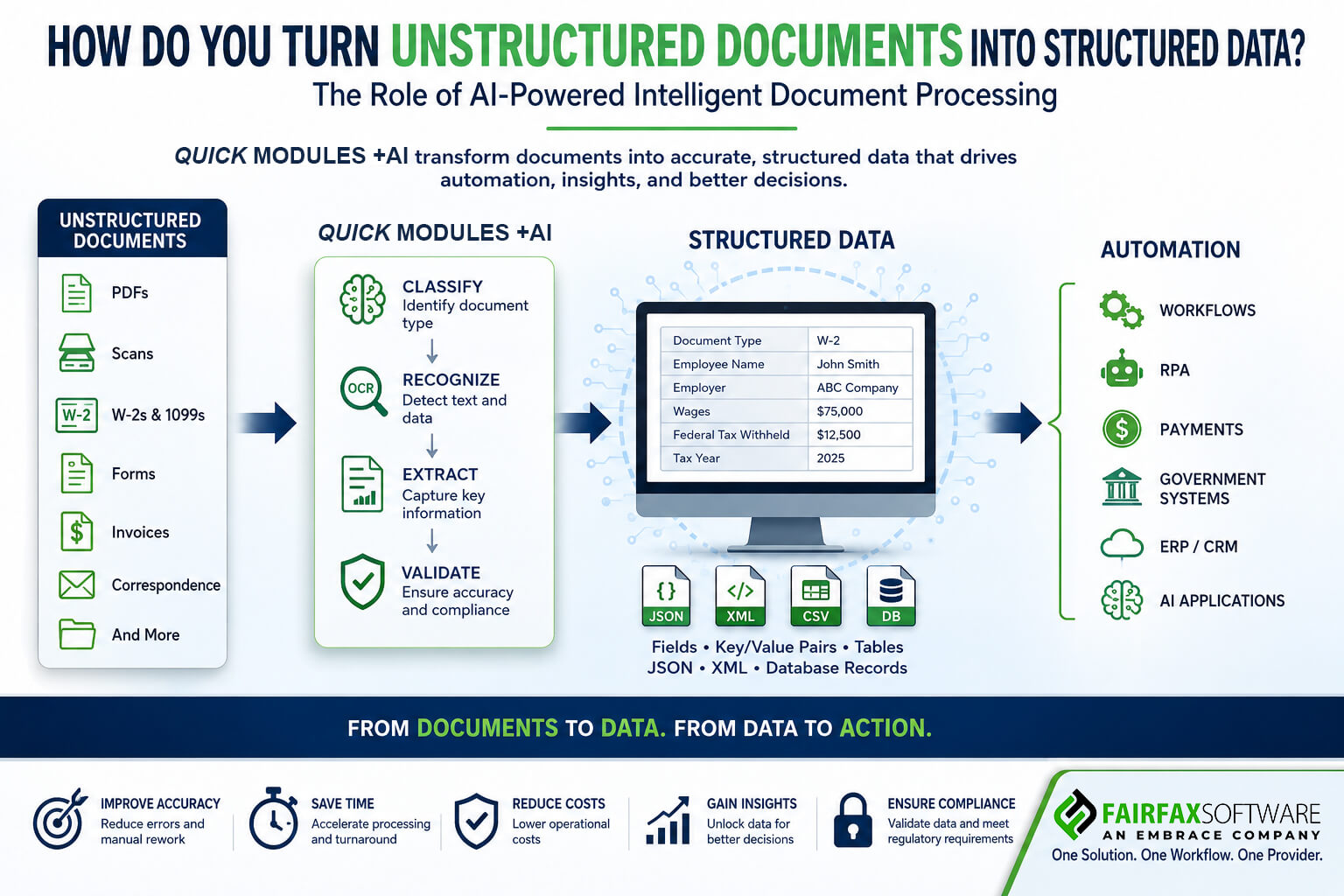
Instead of storing a W-2 as an image, an IDP system can transform it into individual data elements such as:
- Employee Name: John Smith
- Employer: ABC Company
- Wages: $75,000
- Federal Tax Withheld: $12,500
- Document Type: W-2
- Tax Year: 2025
That information can then be delivered as fields, key/value pairs, tables, JSON, XML, database records, or API payloads.
The document has effectively been transformed from something humans read into something software can use.
OCR Is Only the Beginning
One of the most common misconceptions about document automation is that OCR and Intelligent Document Processing are the same thing.
They are not.
OCR, or Optical Character Recognition, primarily converts text contained in an image or scanned document into machine-readable characters.
That is an important first step, but recognizing text does not necessarily mean understanding the document.
Consider a document containing a vendor name, date, purchase order number, line items, prices, tax, and total amount.
OCR can recognize the words and numbers.
Quick Modules +AI goes further by determining what those words and numbers mean and where they belong.
For example, Quick Modules +AI can recognize “$75,000” and determine that it represents wages on a W-2 rather than simply recognizing the characters.
That is the difference between reading a document and understanding a document.
How Quick Modules +AI Turns Documents into Data
Quick Modules +AI involves several interconnected steps.
- Capture the Document
Documents enter a digital processing environment through sources such as:
- High-speed scanners
- Multifunction devices
- File uploads
- Mobile capture
- Document repositories
- Digital transaction systems
- Classify the Document
Quick Modules +AI analyzes the document’s content and characteristics to determine what type of document it is.
A single batch could contain W-2s, 1099s, applications, correspondence, and supporting documentation.
Classification is important because different document types require different extraction rules, fields, or AI models.
- Recognize the Content
Quick Modules +AI recognition identify characters, words, numbers, tables, and other information within the document.
We can process documents with different layouts, fonts, orientations, and quality levels.
- Understand the Document
This is where Quick Modules +AI goes beyond traditional OCR.
Quick Modules +AI analyzes relationships between text, fields, tables, labels, and other elements on the page to determine the context and meaning of the information.
The goal is contextual understanding, not simply character recognition.
- Extract the Relevant Information
Once the document is understood, Quick Modules +AI extracts the information an organization needs.
For example:
Document Type: W-2
Employee Name: John Smith
Employer: ABC Company
Wages: 75000
Federal Withholding: 12500
Tax Year: 2025
The document has now been converted into structured information.
- Validate the Data
Extraction alone is not enough. Organizations need confidence that the information being delivered to downstream systems is accurate.
Validation may include:
- Confidence scoring
- Field validation
- Business rules
- Cross-field comparisons
- Data formatting checks
- Database lookups
- Human review when necessary
This creates an important principle for enterprise IDP:
Quick Modules +AI doesn’t simply extract information. It helps organizations determine whether that information is trustworthy enough to use.
- Structure the Data
After extraction and validation, information can be converted into:
- Database fields
- CSV
- JSON
- XML
- Key/value pairs
- Tables
- API payloads
- Enterprise application records
The information that was previously trapped inside a document is now usable by software.
- Automate the Next Step
This is where document processing becomes business process automation.
Structured information can flow directly into:
- ERP systems
- CRM platforms
- Payment systems
- Case management applications
- Tax systems
- Government applications
- Enterprise content management systems
- RPA workflows
- Data warehouses
- AI applications
The process becomes:
Document → IDP → Structured Data → Workflow → Business System
Instead of simply digitizing documents, organizations can use the information inside them to initiate actions.
Why Structured Data Matters for AI
The value of converting unstructured documents into structured data goes beyond traditional automation.
Organizations increasingly use Quick Modules +AI to analyze information, make recommendations, automate decisions, and orchestrate workflows. But Quick Modules +AI is only as useful as the information it can access.
A scanned document sitting in an image repository may contain valuable information, but it is difficult for downstream systems to use consistently.
Transforming that document into structured, validated data makes the information more accessible to applications, analytics platforms, automation tools, and other AI systems.
This is especially important as organizations move toward agentic AI and AI-driven workflows.
The question is no longer simply: “How do we digitize this document?”
It is:
“How do we make the information inside this document usable by software, automation, and AI?”
Unstructured Data → Structured Data → Automated Action
The modern document-processing architecture can be viewed as a pipeline:
Unstructured Documents
PDFs • Scans • Forms • W-2s • 1099s • Correspondence
↓
AI + OCR + IDP
Classification → Recognition → Extraction → Validation
↓
Structured Data
Fields • Key/Value Pairs • Tables • JSON • XML • Database Records
↓
Automation
RPA • Workflows • Payments • ERP • CRM • Government Systems • AI Agents
The critical point is that document processing is no longer the destination. It is the beginning of an automated process.
Where Does RPA fit into Quick Modules +AI?
RPA, or Robotic Process Automation, can automate repetitive actions performed by Quick Modules +AI.
For example:
- Quick Modules +AI receives and classifies a document.
- Quick Modules +AI extracts and validates the relevant information.
- Quick Modules +AI creates structured records.
- RPA or workflow automation enters the information into another application.
- The workflow routes the transaction, generates notifications, or initiates the next step.
What Makes Quick Modules +AI Different from Traditional Document Capture?
Traditional document capture generally focuses on scanning and OCR. Quick Modules +AI expands that capability with AI-powered document understanding, extraction, validation, and automation.
Traditional Capture | Quick Modules +AI |
Scans documents | Captures documents from multiple sources |
Converts images to text | Understands document content |
Uses predefined templates | Handles document variations |
Extracts text | Extracts meaningful data |
Limited context | Provides contextual understanding |
Manual validation | AI-assisted validation |
Produces digital documents | Produces structured data |
Stops at capture | Connects to workflows and automation |
The result is a fundamental shift: From document digitization to document intelligence.
How Fairfax Software Approaches Intelligent Document Processing
For organizations processing large volumes of documents, Fairfax Software’s, Quick Modules +AI is designed to take document processing beyond basic OCR.
Quick Modules +AI combines document capture, recognition, intelligent processing, and automation capabilities to help organizations transform incoming documents into usable information and connect that information to downstream business processes.
The approach can be summarized as:
Capture → Understand → Extract → Validate → Structure → Automate
Rather than treating the document as the final output, Quick Modules +AI serves as an inbound processing engine that helps transform document-based information into structured data organizations can use.
This is particularly relevant for government agencies, insurance and financial organizations, and other enterprises processing large volumes of forms, applications, correspondence, payments, and other documents.
A Practical Example: Turning a W-2 Into Structured Data
Imagine a government agency receives 100,000 W-2 forms.
A traditional process might look like:
Scan → OCR → Manual Review → Data Entry → Database
Quick Modules +AI can move much of that work into an automated pipeline:
Capture → Classify → Recognize → Extract → Validate → Structure → Database
Quick Modules +AI identifies the W-2, locates relevant fields, extracts the information, validates the results, and produces structured data for downstream processing.
The result isn’t simply a searchable image of a W-2.
The result is usable information.
And once that information is structured, other systems can act on it.
The Future of Document Processing Is About What Happens After Capture
For years, organizations focused on digitizing paper. Then they focused on OCR.
Now the conversation is evolving toward understanding and using document data.
A scanned document is digital, but it may still be difficult for software to use. OCR makes text machine-readable, but it does not necessarily make the information meaningful.
Quick Modules +AI takes the next step by identifying the document, understanding its contents, extracting relevant information, validating that information, and converting it into structured data.
Automation then turns that structured data into action.
The progression is:
Paper → Digital Document → Recognized Text → Understood Information → Structured Data → Automated Action
Frequently Asked Questions About Turning Unstructured Documents into Structured Data
Can OCR convert unstructured documents into structured data?
OCR can convert text from scanned documents and images into machine-readable text, but OCR alone does not necessarily understand the meaning or context of that information. Quick Modules +AI adds classification, contextual understanding, extraction, validation, and structured output.
What is the difference between OCR and Quick Modules +AI?
OCR primarily recognizes characters and converts images into text. Quick Modules +AI goes further by using AI and other technologies to classify documents, understand their contents, extract relevant information, validate results, and deliver structured data to downstream systems.
What types of documents can Quick Modules +AI process?
Quick Modules +AI can process PDFs, scanned forms, tax documents, applications, correspondence, financial records, insurance documents, and other structured or semi-structured documents.
What is structured data?
Structured data is information organized into predictable fields and formats that computer systems can easily store, search, analyze, and process. Examples include database records, JSON, XML, tables, and key/value pairs.
Can Quick Modules +AI extract data from PDFs?
Yes. Quick Modules +AI can analyze PDFs and other document formats, identify document types, locate relevant information, extract data, validate results, and convert information into structured formats.
Can structured document data be used for automation?
Yes. Once document information has been extracted and structured, it can be passed into workflows, RPA processes, ERP and CRM systems, payment platforms, government applications, databases, and AI-driven processes.
Is Intelligent Document Processing the same as data capture?
No. Data capture generally focuses on acquiring information from documents or other sources. Intelligent Document Processing expands that process with document understanding, AI-assisted extraction, validation, and structured output.
From Documents to Data, and From Data to Action
The real value of Quick Modules +AI isn’t simply getting information out of a document.
It’s making that information usable.
When Quick Modules +AI can capture an incoming document, understand what it contains, extract the information that matters, validate the results, convert that information into structured data, and send it into an automated workflow, organizations can fundamentally change how document-driven processes operate.
The future of document processing isn’t just digital documents. It’s intelligent, structured, actionable data.
For organizations looking to move beyond traditional OCR and document capture, Fairfax Software’s Quick Modules +AI provides an approach for turning unstructured document information into structured data and connecting that data to the processes and systems that keep the organization running.
One document. One workflow. One automated process.